A shared home for your learning files and documents
Organize reusable resources in the Organization Library, find them in context, and manage access as they become part of your learning paths.
A learning platform holds more than finished lessons. It also holds the documents, images, and other resources that authors use to build them. As those resources grow, teams need a practical way to find the right file and understand how it is being used.
The Organization Library gives those assets a structured home in eDoer. It brings folders, search, sorting, shortcuts, and permissions into the file workflow, helping curators organize resources and reuse them when developing learning paths.
Organize resources around the way you work
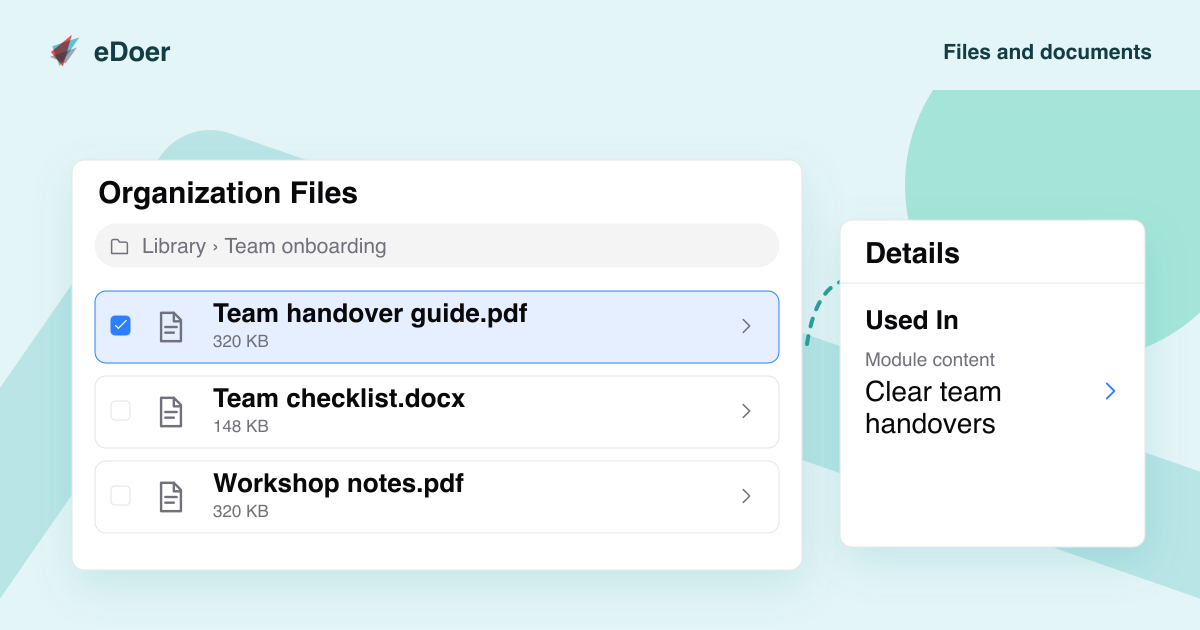
Create folders, upload files, and give items names that make sense to the people who will use them. Files and folders can be renamed and moved as your collection develops. Breadcrumb navigation makes the current location visible while you browse.
A team might organize a collection by subject, department, or learning initiative. What matters is that another author can understand the structure and find the relevant material. Search and sorting provide additional ways to locate resources when browsing alone would take too much work.
Reuse resources while building learning content
The library connects to file selection in the authoring workflow. Curators can select an existing resource when adding content, keeping reusable material within reach as they build a module or work on a learning path.
Shortcuts provide another way to organize access to an existing file. Path-focused views and contextual navigation help authors work with relevant resources while keeping a connection to the wider organization library. This gives files a place in the content workflow beyond the moment of upload.
Keep access and usage visible
Library permissions control the capabilities available for files and folders. Visibility and access depend on the organization, the user’s role, and the relevant learning context. Authors can work with the resources available to them within those boundaries.
Usage information helps explain where a resource is referenced, and deletion restrictions take those references into account. Before changing or removing an asset, consider the learning content that depends on it. The library supports that everyday editorial responsibility with a more organized view of the resources your team maintains.
The takeaway
Learning resources become easier to maintain when organization, reuse, permissions, and usage are part of the same file workflow.